Pages

Monday, October 9, 2017

Icons and Labels


Fancy icons make way for informative button labels. Along the way, information gets lost. 


Zoom web conferencing tool understands this painpoint. When a user hovers over the icons, they turn into informative buttons.


What do your icons convey?


Friday, October 6, 2017

E-Commerce Wars


Myntra,  a part of Flipkart is fighting head to head with Amazon in the e-commerce space. Myntra is fighting on prices, offers, sale days and what not. 


One thing they clearly lacked is the visibility of Wishlist and Cart on their app. With recent Big Billion Day sale, they put Wishlist right at the top and cart as a tab control, in easily accessible places.

Smart move!


Thursday, October 5, 2017

iPhone Address Book


You are a proud owner of iPhone. You want to add a contact.


You want to add a mobile phone number. You need to keep tapping until you get the mobile option.

Who uses fax and radio these days? 

Wednesday, October 4, 2017

Sorry! No Seat For You


Flight booking mobile apps can get funny sometimes. They show stuff they don't have and then tell you that they don't have it. Take a look at this pearl.


I searched for Economy class flights. I told my intent at first that I am looking for Economy class. Then, why do you show me flights that do not have economy class, and guide me to select my preferred flight and then tell me that seats are not available.

Why are you showing those flights to me in the first place?

Why show stuff to users, that you don't have anyway?


Tuesday, October 3, 2017

Websites with Skeleton Screens


Make My Trip made a decent implementation of skeleton screens on its website.


What do you think?


Monday, October 2, 2017


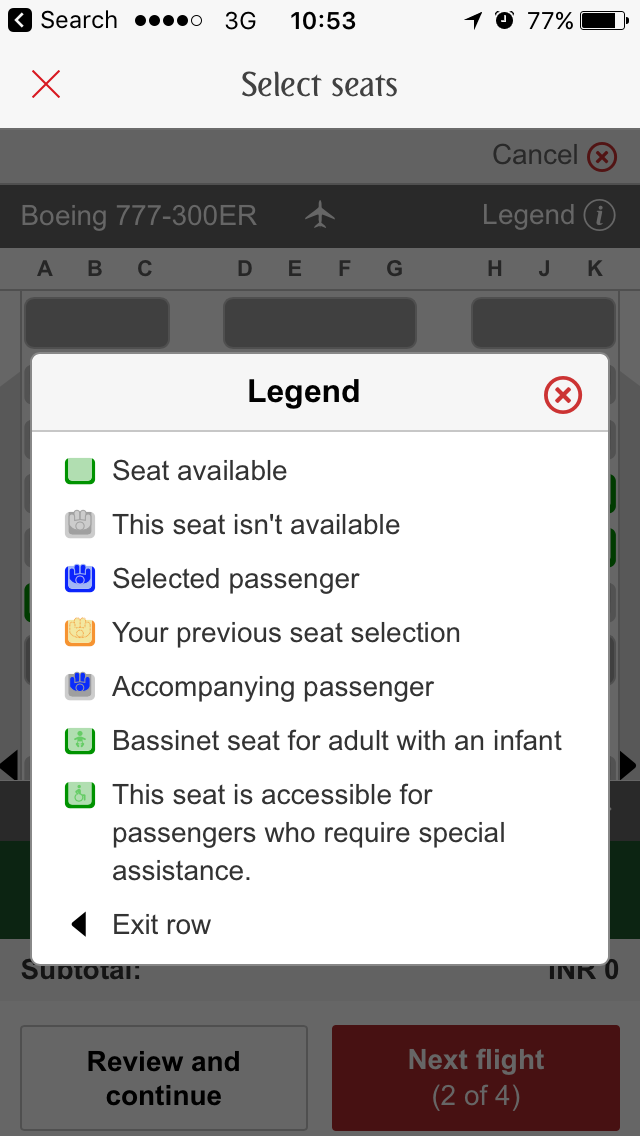
Seat selection is a nightmare for travelers. Few airlines allow seat selection/modification at the time of check-in. Few allow travelers to select seats on the date of departure. Few disable this setting. Travelers cannot know which airline/app has configured which setting.


If you are lucky, you might get to choose your seat. During the process, you will see many icons as shown above, with no understanding of what they mean. Until, you find the 'i' icon or the 'Legend' icon, if you are lucky. Once you find it, you have to learn it, close this pop-up and then select the seats accordingly.

Isn't this cognitive load unnecessary? What do you think?